


The Oregonian
3.6113.00 Reviews
App Specs
- Version
- 8.0.0
- Updated On
- License
- Free
- Downloads
- 10,000+
- Developer
- OregonLive.com | Oregonian Media Group
- Categories
- News & Magazines
- Platform
- Android
Screenshots
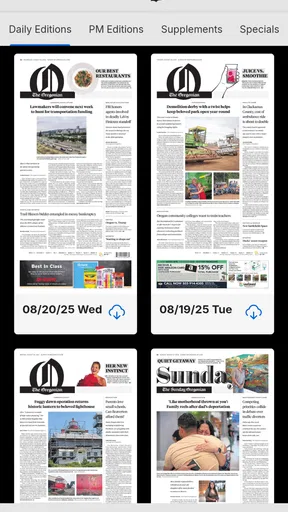
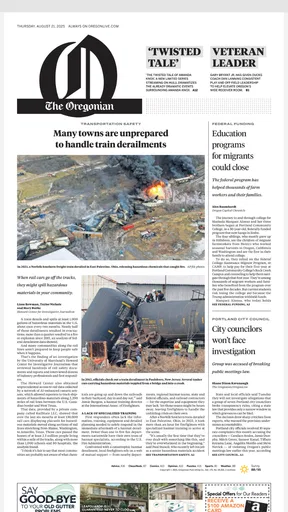

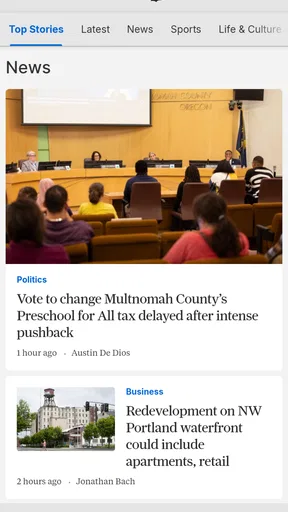
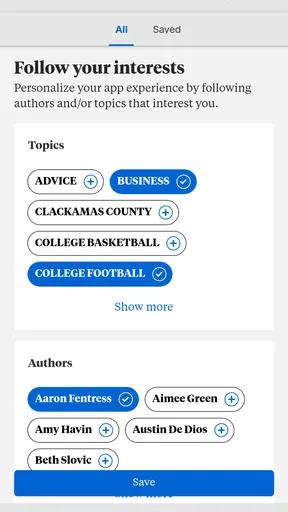
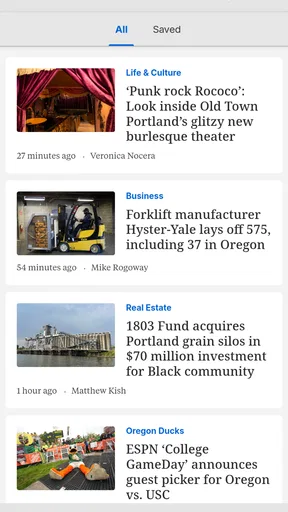


 Analysis by AppCompare
I found The Oregonian most useful when I treated it as a shared news source rather than just another app icon on my phone. The app brings Oregonian newspaper coverage into a mobile format, which makes it practical for a household where different people want to keep up with local events at different times. I could check headlines during a quiet moment, then leave a story open for someone else to read later on the same device.
That shared-device angle matters because local news is often discussed at home even when everyone has different schedules. One person may care about city decisions, another about regional issues, and someone else may simply want a quick sense of what is happening nearby. The Oregonian has a clear purpose in that setting: it is a focused news and magazine app from OregonLive.com | Oregonian Media Group, not a general-purpose feed trying to cover every subject equally.
How The Oregonian fits into everyday household reading
In my experience, the best use case is a household that wants a common local reference point without passing around a printed newspaper. I can imagine opening the app over breakfast, scanning the available coverage, and later discussing a story with a partner or family member. On a shared tablet, the same routine can work in the evening, although I would be careful about leaving an account signed in if several people use that device.
The app is free to install, so trying it does not require an upfront payment. That makes it easy to place beside other news sources and decide whether its coverage suits your routine. The important distinction is that free installation does not necessarily mean every part of the reading experience is available without an account or purchase. The app lists in-app purchases at $24.99 per item, so I would check the terms shown during sign-up or when opening restricted material before assuming the entire publication is freely accessible.
That is one of the first practical boundaries I would explain to another person in the household. If one person installs the app casually and another later encounters a subscription or purchase screen, confusion can follow. On a shared device, I would agree in advance who is allowed to approve any purchase and whether the app is being used for occasional browsing or as a regular newspaper replacement.
The Oregonian is rated for Everyone 10+, which feels like a useful reminder that news is not the same as children’s entertainment. A younger reader may encounter serious events, upsetting subjects, or opinions that need context. I would be comfortable recommending it for older teens and adults who can discuss news critically, but I would not hand it to a young child as an unsupervised reading app simply because the installation rating sounds broadly accessible.
Starting without making the household account messy
Setup is straightforward in principle: install the app, open it, and explore how the publication presents its coverage. The part that deserves more attention is account ownership. On a personal phone, signing in is usually simple. On a family tablet, however, I would decide whether the app belongs to one reader, a shared household account, or a single person who manages access for everyone else.
Worth Reading Before You Choose

EA SPORTS FC Mobile 26 Is a Bigger Football Game, but It Takes Time

Flipboard Shows What News Apps Must Do Beyond the Feed

Switching to Android Auto Means Rethinking Your Driving Routine

Google Calendar Makes a Crowded Week Easier to Manage

Ludo King Makes the Most of the Minutes Between Plans

Baby Panda World Brings Quick Play to Modern Phones, but Its Game Library Feels Busy
I would avoid casually mixing several people's credentials on the same device. News apps can remember a session, and a later reader may not know whose account is active or which purchase option is being offered. Even without inventing special family controls, a basic household rule helps: the account holder should be the person who understands the payment terms, while other readers should know when they are viewing shared access rather than their own account.
This is also where expectations about personalization matter. If someone in the house wants a private reading history or a separate set of preferences, a shared login may not be ideal. If the goal is simply to read the same local publication together, shared access can be convenient. I would make that choice deliberately instead of treating the app like a completely anonymous newsstand.
The current version is 8.0.0 and requires Android 8.0 or later. That is worth checking before installing it on an older household phone or tablet. A newer personal phone is less likely to create trouble, but shared devices often stay in service longer than expected. If the app cannot be installed on the older device, the family may end up reading from separate phones, which changes the whole advantage of having a common screen.
Coordinating reading without turning news into another chore
One strength of a local newspaper app is that it can give household conversations a common starting point. Instead of sending several unrelated links from different sources, I could point someone toward a story in The Oregonian and discuss it later. That is especially useful when one person has more time to read than the others: the early reader can mention the subject, while the rest of the household can open the app when convenient.
I would not expect the app alone to organize family communication. It is a reading tool, not a household planner. For coordination, I would use a simple routine outside the app, such as sharing the headline in a family message or mentioning a section to revisit after dinner. The value comes from pairing the publication with an existing habit, not from assuming the app will manage everyone’s schedule.
A small but useful workflow is to separate quick checking from deeper reading. When I have only a minute, I look for the most relevant local items rather than trying to finish everything. Later, I return when I have time to read carefully. That prevents the app from becoming a source of pressure and makes it easier for different family members to use it at their own pace.
Another trade-off appears when several people want the same device. A phone is convenient for private reading but less suitable for passing around. A tablet is better for shared viewing, yet it raises the account and privacy questions mentioned earlier. I would choose the device based on whether the household values individual convenience or a common reading space.
For a family that already follows local news through a browser, this app may not radically change the content routine. Its advantage is convenience and a more dedicated place for The Oregonian. If someone prefers a single aggregator that combines national, international, and local sources, that alternative may be more efficient. The Oregonian makes more sense when local coverage is the priority and the household wants one publication to return to regularly.
Age, trust, and conversations about what gets read
The age rating should be considered alongside the maturity of the reader, not used as a substitute for judgment. News can include difficult subjects even when an app is not designed for explicit entertainment. In my view, the most responsible household approach is to let older readers explore independently while staying available for younger teens who have questions about a story’s context or language.
I also would not present one newspaper app as the final word on every issue. Trust grows when readers compare reporting, notice distinctions between news and opinion, and ask where information comes from. The Oregonian can be a strong local starting point, but I would encourage teenagers and adults to read carefully rather than accepting every headline at face value. That is not a criticism unique to this app; it is simply part of using news responsibly.
The developer, OregonLive.com | Oregonian Media Group, gives the app a clear connection to the Oregonian newspaper brand. That focus is helpful for readers who want regional relevance, but it also means someone seeking a broad international briefing may need another app alongside it. I would not install this expecting a complete replacement for every source used by the household.
The average rating is 3.6 from around 207 ratings, with roughly 113 written reviews. I read that as a sign to keep expectations realistic rather than as a reason to dismiss the app. News apps can feel very different depending on a person’s preferred coverage, device, account situation, and tolerance for purchase prompts. The rating suggests that the experience is useful for some readers but not universally smooth.
Where it works better than the usual alternatives
Compared with a general news aggregator, The Oregonian offers a narrower identity. That can be an advantage when I want local relevance instead of an endless mixture of headlines. A broad aggregator is better for quickly switching between many publications, while this app is better for readers who deliberately return to one Oregon-focused newspaper source.
Compared with reading the newspaper in a mobile browser, a dedicated app can feel easier to reach during a daily routine. I do not have to start from a blank browser tab or search for the publication each time. The trade-off is that an app occupies storage and may require updates, and its account flow can be more visible than simply opening a web page.
Compared with social media, the app is a calmer place to begin reading. Social platforms are useful for discovering what people are discussing, but they mix reporting with reactions, reposts, and distractions. I prefer using The Oregonian when I want to focus on the publication itself rather than follow a conversation around a headline.
There is also a household trust advantage in choosing a known publication instead of letting every person rely on a different algorithmic feed. That does not make the app neutral or complete, and it should not stop readers from comparing sources. It does, however, give a family a shared starting point that is easier to discuss than several personalized feeds no one else can see.
Limitations I would consider before installing
The first limitation is the possibility of friction around access and payment. Because the app includes $24.99 in-app purchase items, I would read each screen carefully before confirming anything. A person who only wants occasional headlines may find a purchase-based reading path less appealing than a free news aggregator or a browser search.
The second limitation is the narrow geographic focus. If your daily reading is mostly national technology news, international affairs, sports from several regions, or entertainment coverage from everywhere, this app may feel incomplete. It is most convincing for people who specifically want Oregonian coverage and are willing to make that focus part of their routine.
The third limitation concerns shared devices. A common tablet can make the app feel like a household newspaper, but shared sessions can blur who is signed in and who is responsible for a purchase. I would use a personal device for private reading and a shared device only when everyone understands the account arrangement.
A fourth consideration is age context. The Everyone 10+ rating does not mean every article is suitable for every child or every moment. Parents and guardians should decide whether a younger reader is ready for current events and should be prepared to talk through difficult material. Readers who want a completely controlled, child-focused news environment should look elsewhere.
Finally, the app has over 10K installs, which shows that it has found an audience but also places it in a smaller scale than the largest national news platforms. That is not automatically negative; a focused local publication can be exactly what someone wants. It simply means I would judge it by the quality and usefulness of its Oregon coverage, not by expecting the breadth or polish of a massive global news service.
My household verdict
I would recommend The Oregonian to an Oregon-focused household that wants a dedicated local news app and is comfortable checking account and purchase details carefully. It works particularly well when one person starts the day with a quick scan and other family members return to the same publication later. The app can support shared conversations without requiring everyone to read at the same time.
I would skip it if your main goal is a single free app covering the whole world, or if you dislike managing publication-specific accounts and purchase screens. I would also avoid treating it as a children’s reading app simply because its age rating is not restricted to adults. A general aggregator, browser-based reading, or another publication may be a better fit for those needs.
My final impression is positive but measured. The Oregonian has a clear role: putting one established Oregon newspaper source within easy reach on a phone or tablet. Its strongest value comes from focus, routine, and shared local awareness. Its weaker points are the boundaries around paid access, the need for sensible account handling, and the fact that local focus is not the same as broad coverage.
If I were installing it for a household, I would first confirm that the device runs Android 8.0 or later, decide who owns the sign-in, and agree that no purchase is made without the account holder’s approval. After that, I would give it a fair trial as part of a daily reading habit. For readers who want Oregon news in one dedicated place, that focused approach is the app’s clearest reason to stay installed.
Pros
- Reliable coverage of Oregon news
- politics
- weather
- and local events.
- Clean layout makes articles easy to browse on mobile devices.
- Personalized alerts help you follow important stories as they develop.
- Includes in-depth reporting and opinion content beyond breaking news.
- Digital access is convenient for readers who live outside Oregon.
Cons
- Many full articles may require a paid subscription to read.
- Some content can feel focused mainly on the Portland metropolitan area.
- Frequent notifications may become distracting without careful customization.
- The app may use noticeable storage for downloaded articles and media.
- Some users may prefer a lighter news app with fewer subscription prompts.
FAQs for The Oregonian
What is The Oregonian app?
The Oregonian app is the mobile edition of The Oregonian/OregonLive, providing access to news and reporting focused on Oregon and the Pacific Northwest. After installing it, readers can browse local and regional stories, follow major breaking-news events, read opinion and lifestyle coverage, and keep up with sports, business, politics, and community updates in a format designed for phones and tablets.
Is The Oregonian app free to download and use?
The app is generally free to download, and some articles or features may be available without a subscription. However, full access to the publication’s digital journalism typically requires a paid subscription or account, depending on the current offer and platform terms. Before downloading, check the app listing and subscription screen carefully for pricing, trial periods, renewal conditions, and available access levels.
What kind of content can I read in The Oregonian app?
The Oregonian app covers a broad range of subjects, including Oregon news, Portland-area reporting, politics, crime, education, transportation, weather, business, sports, entertainment, food, and local events. The content mix can include breaking updates as well as longer investigative and feature stories. Coverage is especially useful for readers who want news connected to Oregon communities and regional issues.
Does The Oregonian app offer notifications and personalized news features?
The app may provide push notifications for breaking news, important local developments, and selected topics. Notification options can usually be managed through the app or your device settings, allowing you to reduce alerts if they become too frequent. Depending on the current version, users may also find saved articles, account-based preferences, or other tools that make returning to preferred coverage more convenient.
Can I read The Oregonian offline or on multiple devices?
Offline reading and multi-device access depend on the app’s current features and the type of subscription you have. Some editions may support downloading or caching selected content, but users should not assume that every article will remain available without an internet connection. Signing in with the same account on supported Android or iOS devices may allow subscription access across devices, subject to the publisher’s terms.


